
Task 1A submission
Submission Instructions for Task 1A:
Note: All your tasks will be checked using a plagiarism software. If any submitted file is found to be plagiarised, e-Yantra reserves the right to disqualify the team.
Once You have built the algorithm for line follower ,For Submission and Evaluation follow this instruction:
NOTE: For Task 1A submission you have to upload a
Sprint_<Team-ID>_Task_1A.zipfile and submit Unlisted YouTube Video Link and make sure the video includes the Bridge and Python files terminal.The video frame should look something like this.
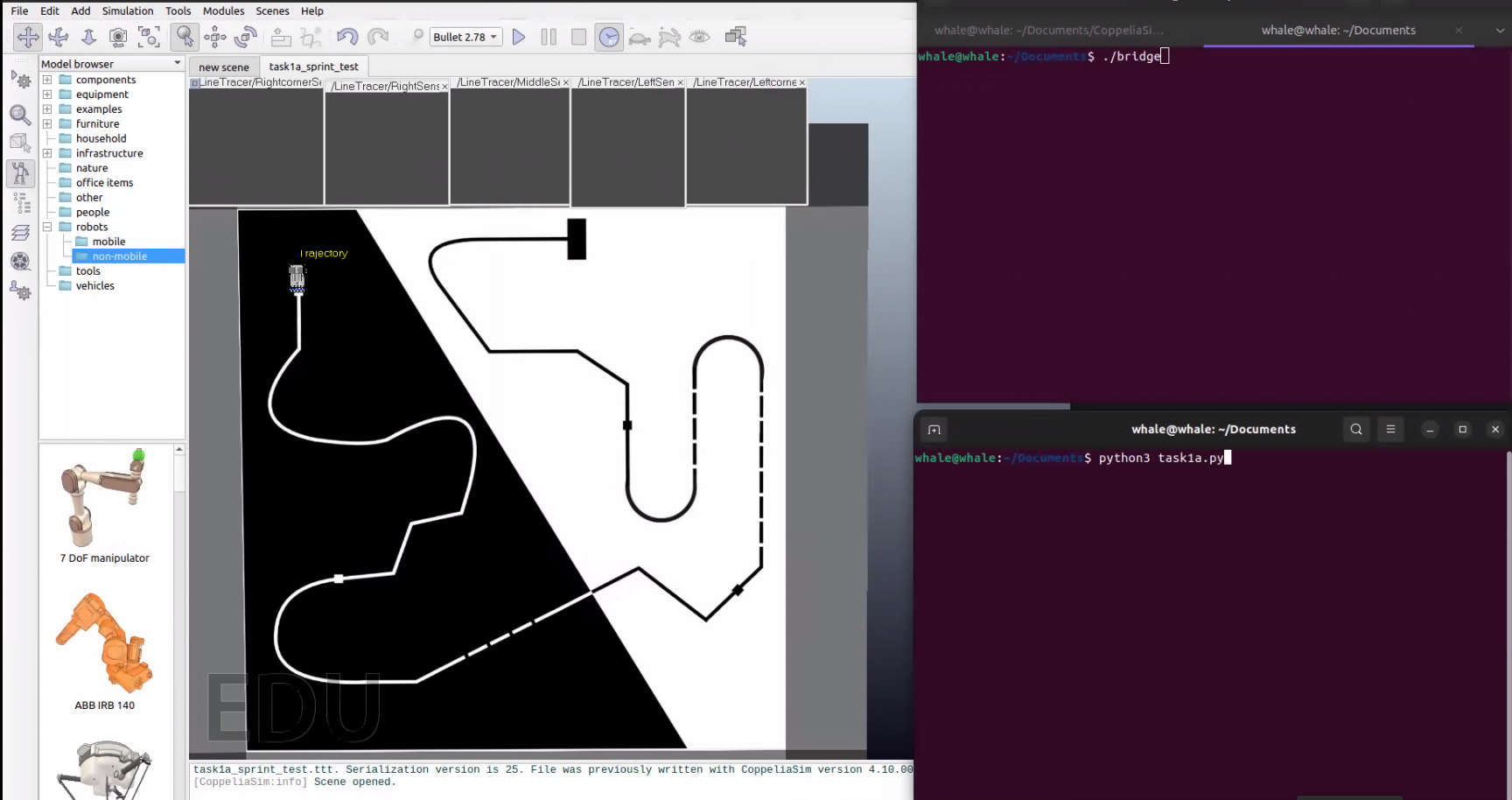
-
Launch the Scene in the Coppiliasim using the task1a_scene.ttt file
-
Run the Bridge file using this parameter
- For Windows:
./bridge.exe --eval - For Ubuntu:
./bridge --eval
- For Windows:
Once You run this commands it will show that evaluation started in the terminal
Note: After this don't forgot to start the screen recording
-
Run the Python File
-
For Windows:
python task1a.py -
For Ubuntu:
python3 task1a.py
-
And once the evaluation completed it will generate an result.json file.result.json is a Encrypted file So Do not edit the File.
-
Teams need to submit following files:
Task1a.pyfileConnector.pyfileresult.jsonfile
-
Compress this files into a
Sprint_<Team-ID>_Task_1A.zip.
Note: Make sure your not putting this files inside an folder and compress it
- the Zip File structure should look like this
|__sprint_XXX_Task_1A.zip
… |__Connector.py
… |__task1a.py
… |__result.json
-
Instructions for submitting the video task:
-
Upload your video on YouTube.
-
The name of the video should follow the syntax given below: If your Team ID is 34, you should name the video as
Sprint1#34_Task_1Aon YouTube. -
Your uploaded video should be Unlisted.
-
Copy the URL of your video, paste it in the text box given in the Task 1A page of eLSI Sprint Portal.
NOTE: File names mentioned are case sensitive. Verify the file name before making the submission.
-
-
Congrats, you have successfully submitted Task 1A!
Grading:
This task will be graded out of 100:
Maximum Marks - Marks: 100.00Failed Task - Marks: 0.00
Formula
Task_1A_Marks = Max(20,(100-(RT*0.25)))for a completed run; 0 otherwise
RT: Run Time
- Run time refers to the Time Require to complete the Run from Start to finish in seconds.
- A minimum of 20 marks is awarded for completing the track, regardless of the time taken.
- No Points will be Awared if the bot doesn't Complete the track or skips portion of the Track.