
Task 1B submission
Submission Instructions for Task 1B:
Note: All your tasks will be checked using a plagiarism software. If any submitted file is found to be plagiarised, e-Yantra reserves the right to disqualify the team.
NOTE: For Task 1B submission you have to upload a
Sprint_<Team-ID>_Task_1B.zipfile and submit Unlisted YouTube Video Link.
-
Once you have Trained your Linefollower using task1b.py.We need task1b.py for evaluation.
-
To Test and Evaluate your solution, follow the steps given below:
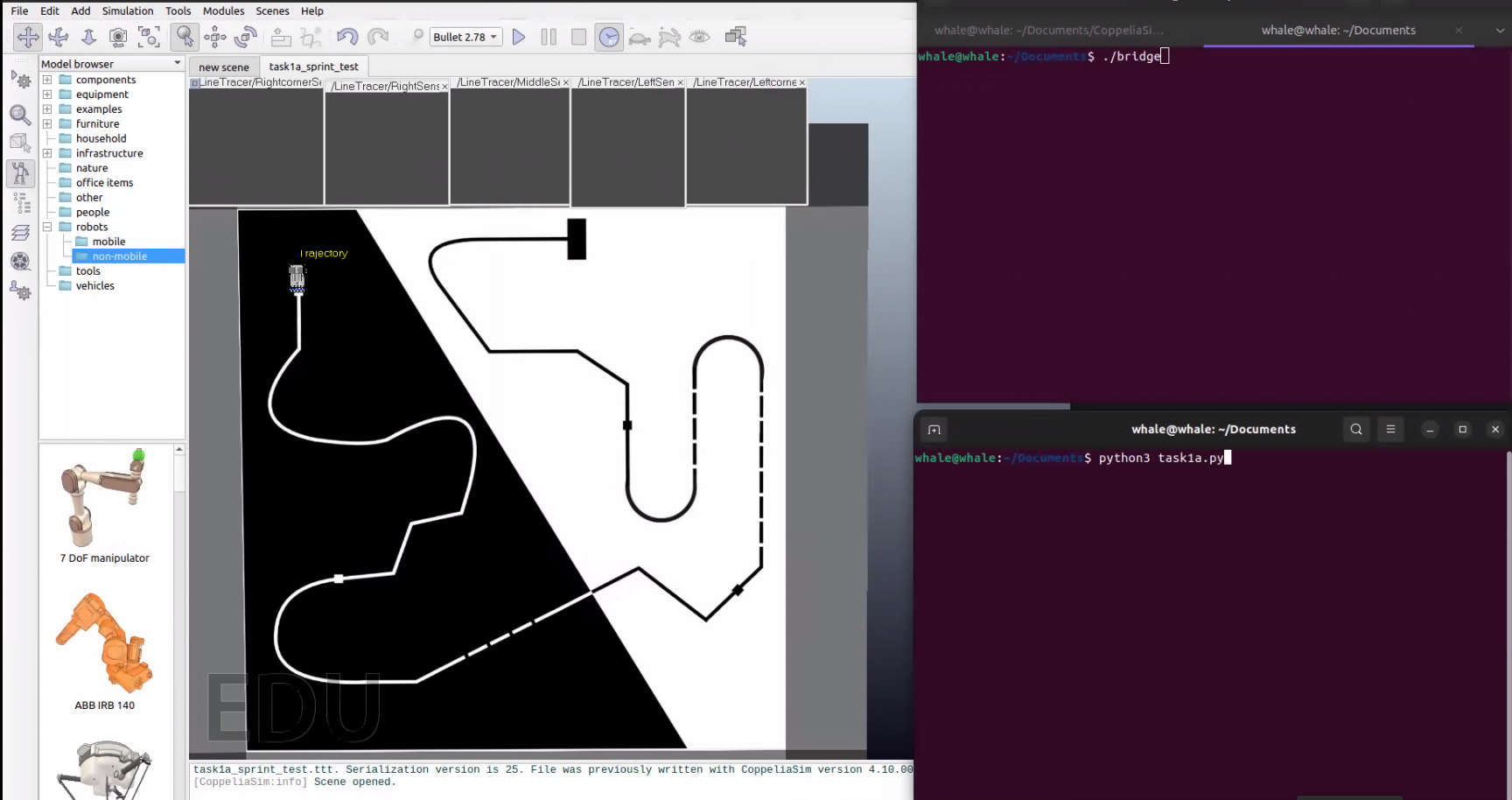
NOTE: Make sure to turn on the Screenrecoding while evaluating.The Screenrecording must have both the Terminal Windows for bridge, task1b.py(test mode) and the Task1b Scene Window Running simealtaneously.The video frame should look something like this.
-
Run the
Bridgeapplication:- For Windows:
./bridge.exe --eval- For Ubuntu:
./bridge --eval -
Run your task1b.py program in new Terminal Window:
python task1b.py --mode test -
After the evaluation is Completed a result.json file will be Generated.result.json is an encrypted file So do not edit the file.
-
For Task 1B submission you have to upload a
Sprint_<Team-ID>_Task_1B_rl.zipfile and submit YouTube Video Link. -
Teams need to submit following files in the .Zip File:
result.jsonfiletask1b.pyfileConnector.pyfileq_table.pklfile
-
Compress this files into a
Sprint_<Team-ID>_Task_1B.zip.
Note: Make sure your not putting this files inside an folder and compress it
- File structure should be
|__Sprint_1234_Task_1B.zip
… |__result.json
… |__task1b.py
… |__Connector.py
… |__q_table.pkl
-
Instructions for submitting the video task:
-
Upload your video on YouTube.
-
The name of the video should follow the syntax given below: If your Team ID is 34, you should name the video as
Sprint1#34_Task_1Bon YouTube. -
Your uploaded video should be Unlisted.
-
Copy the URL of your video, paste it in the text box given in the Task 1B page of eLSI Sprint Portal.
NOTE: File names mentioned are case sensitive. Verify the file name before making the submission.
-
Congrats, you have successfully submitted Task 1B!
-
Grading:
This task will be graded out of 100:
Maximum Marks - Marks: 100.00Failed Task - Marks: 0.00
Formula
Task_1B_Marks = Max(20,(100-(RT*0.25)))for a completed run; 0 otherwise
RT: Run Time
- Run time refers to the Time Require to complete the Run from Start to finish in seconds.
- A minimum of 20 marks is awarded for completing the track, regardless of the time taken.
- No Points will be Awared if the bot doesn't Complete the track or skips portion of the Track.